
Certified Payroll Example: Interact With New Form WH-347

What Is Certified Payroll?
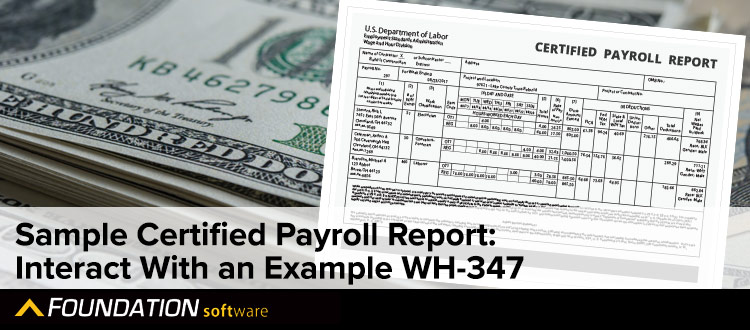
Certified payroll refers to weekly construction labor reporting that a contractor submits for each government contract they’ve worked on. This, along with a signed statement of compliance, “certifies” to federal, state or local agencies that workers on the project have earned at least the required “prevailing” or standard wages.
According to the U.S. Department of Labor, prevailing wage violations on federally funded construction projects resulted in over $42 million in back wages recovered for workers in 2022, highlighting the critical importance of proper certified payroll compliance.
Federal, state and local laws determine whether a prevailing wage is required for public works projects. But each agency may determine its own prevailing wage rate requirements. These represent a standard rate of compensation for each class or trade of construction worker on a similar job in the same geographic area. And one way they set these is through wage-determination surveys that working contractors submit.
Similarly, each agency may use its own form and reporting procedures. Therefore, there’s no one universal certified payroll report for all cases. But some are more common than others. The U.S Department of Labor, for example, uses Form WH-347.
When Is Certified Payroll Required?
Certified payroll is required on all federal projects covered by the Davis-Bacon Act, which applies to government-funded projects with construction contracts exceeding $2,000. This federal law ensures that workers on these projects receive fair compensation through adherence to local wage requirements.
Beyond federal projects, many state and local wage laws also mandate certified payroll reporting requirements for public works.
When subcontractors are involved in a project, the employing prime contractor is typically responsible for ensuring all subs comply with these certified payroll report requirements as well, regardless of project location.
Construction companies must verify whether their specific construction contract falls under these regulations, as non-compliance can jeopardize future contracts and result in significant penalties.
What Is Prevailing Wage?
Prevailing wages are the hourly rate of pay that workers in similar labor classifications receive for comparable work in a specific geographic area. These wage requirements are established through surveys of local construction markets and updated regularly to reflect current compensation standards.
Prevailing wage requirements can be satisfied via the appropriate base hourly rate or a lower base hourly rate that is bolstered by the inclusion of fringe benefit plans such as health insurance, retirement contributions and vacation pay.
This comprehensive approach ensures construction payroll productivity standards are maintained while protecting worker compensation across all government-funded projects.
What Changed on the New WH-347 Form?
The U.S. Department of Labor revised Form WH-347 in January 2025, adding more detail about projects, workers, wages and fringe benefits for contractors to use for weekly certified payroll under the Davis-Bacon and Related Acts. While the new WH-347 version was released and available for use starting back in the beginning of 2025, it wasn’t mandatory until the deadline of September 30, 2026. Now all contractors are required to use this updated version.
While the purpose of the form remains the same, the new WH-347 includes additional fields designed to provide more detail about the project, workers, wages and fringe benefits being reported.
Some of the key changes include:
- Wage determination number: Contractors now list the applicable wage determination number(s) directly on the form, along with the project name, location, contract number and certified payroll number.
- Final payroll identification: A checkbox shows when a submission covers the contractor’s or subcontractor’s final week of work on the project.
- Worker status: Each worker is identified as a journeyworker (J) or registered apprentice (RA), with the apprentice’s level of progression when applicable.
- Worker reporting: The revised form assigns each worker a worker entry number while continuing to use an identifying number, such as the last four digits of a Social Security number. The previous withholding exemptions column has also been removed.
- More detailed fringe benefit reporting: Separate columns show fringe benefit credits and cash payments made in place of fringe benefits, and page 2 breaks down each fringe benefit plan.
- An updated Statement of Compliance: Page 2 now uses six checkbox certifications covering payroll accuracy, required records, worker classifications, apprentices, fringe benefits and payment of wages, plus the certifying official’s name and title.
The sample below shows the revised WH-347 so you can see where this information appears and what to expect when completing the current form.
Sample Certified Payroll Report
By clicking on the new sample WH-347 form below, you can learn more about the kinds of information a typical certified payroll report requires and how construction-specific tools like FOUNDATION and Payroll4Construction make the process of completing it automatic by using data from your processed payrolls.
Page 1: Certified Payroll Reporting
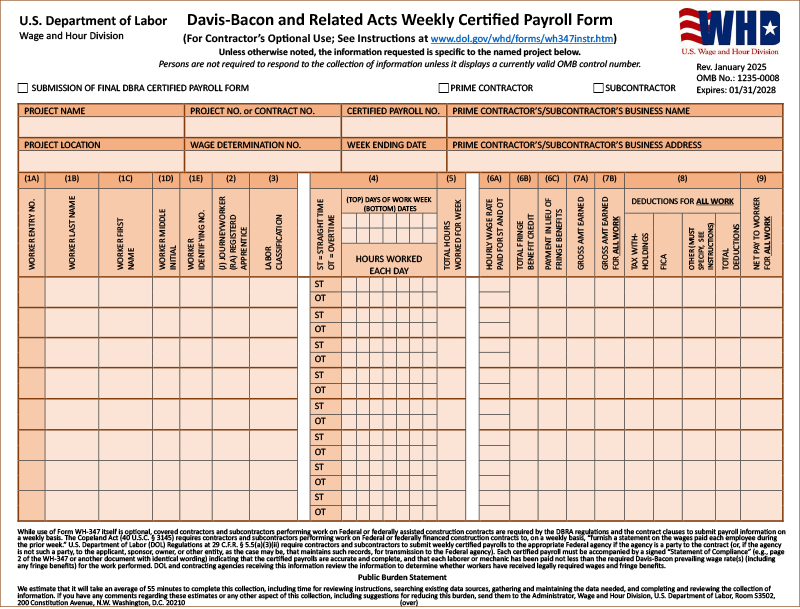
If this is the final submission, check this box. On the Options tab of the certified payroll report, check “Submission of Final Form.”
Select whether you’re the prime contractor or a subcontractor on the project by checking only one box. In FOUNDATION, this part is completed automatically using a field called Contract Type under the “Addl” tab of the job record.
“OMB” is short for “Office of Management and Budget,” and an OMB control number is assigned with an expiration date to each government form. For example, Form WH-347’s OMB Control No. 1235-0008 expires 01/31/2028.
FOUNDATION prints this information automatically based on the WH-347 form selected on the Criteria tab of the certified payroll report.
Enter the name of the project and its address or location. FOUNDATION will do this automatically based on the timecard history, and the address will print as it appears under the “A/R” tab of the job record.
FOUNDATION uses the number entered in the Contract field of the job record’s “Payroll” tab.
Enter the wage determination number(s) and revision number(s) included in the covered contract and relevant to the submitted certified payroll form. This information is entered on the “Options” tab of the certified payroll report.
This will be the date of the last day of the report’s workweek. In FOUNDATION, it’s pulled from the date ranged selected to run the report.
Enter your firm’s name along with the complete mailing address for your firm’s primary place of business. FOUNDATION prints these using system settings.
Enter a worker entry no. in ascending order (e.g., 1, 2, 3, etc.). If a worker appears twice, for instance they worked in more than one labor classification, use the same worker entry no for the employee.
Enter the worker’s last name, first name, middle initial (if available), and a worker identifying no., such as the last four digits of the employee’s Social Security number. Do NOT use a worker’s full Social Security number.
FOUNDATION uses timecard history to identify the appropriate employees for each certified payroll report and pulls their name and last four digits of their Social Security number from the database. FOUNDATION assigns the worker entry no. when the report is generated.
This reports the worker’s labor classification, which can be found in the applicable Davis-Bacon wage determination(s) for the contract, and if they are a Journey Worker or Registered Apprentice — this is not necessarily their typical work or title.
FOUNDATION uses timecard history to identify the labor classification (Trade) and the Trade record to identify if they are a Journey Worker or Registered Apprentice.
First, enter each day in your payroll week, keeping in mind that your payroll week may begin on a different day than the calendar week (e.g., Monday instead of Sunday). Next, identify the date for each day of the week. Finally, separately list the straight time and overtime hours under each appropriate date for each employee.
FOUNDATION completes all of this automatically.
In the box that lines up with straight time hours worked, list the actual hourly rate paid for straight time. Then, do the same for your overtime rates.
FOUNDATION completes this automatically based on the earn codes used on the worker’s timecards.
These boxes report the total Fringe Benefit Credit for the worker and/or the total amount of cash paid to the worker in addition to or in lieu of fringe benefits.
FOUNDATION completes this automatically using timecard history and the Benefit Types entered on the Options tab for the certified payroll report.
This box reports the worker’s Gross Amount Earned for the job and labor classification.
FOUNDATION completes this automatically using timecard history.
These boxes report the worker’s Gross Amount Earned, total Deductions and the worker’s Net Pay for all work performed during the week (all jobs).
FOUNDATION completes this automatically using timecard history.
Each weekly certified payroll submitted is identified in ascending order, e.g., 1, 2, 3, etc.
FOUNDATION determines this number using the timecard history on the project and, if needed, by checking the “Base Payroll No. on Actual Weeks Worked” checkbox on the Criteria tab of the certified payroll report.
Page 2: Statement of Compliance
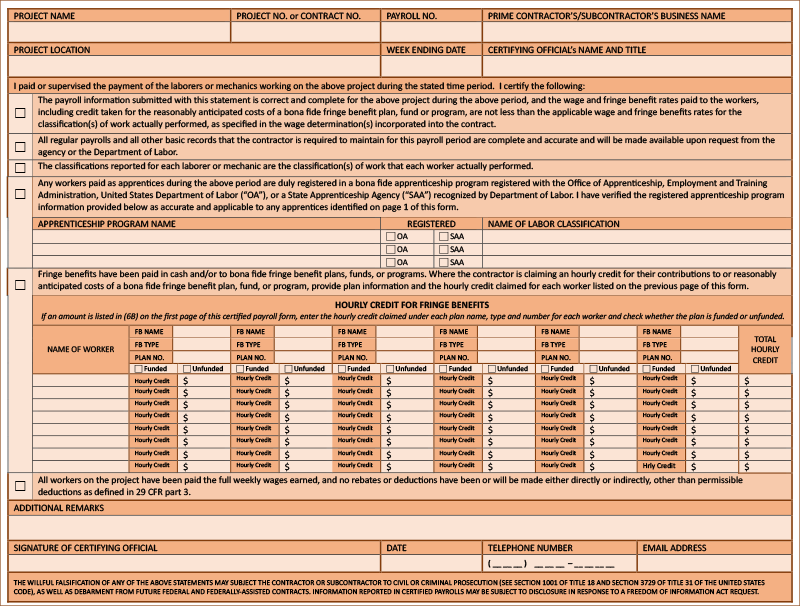
Additional Remarks about deductions, fringes or other explanations about the certified payroll report can be added.
The Addl Sign Sheet tab of the certified payroll report in FOUNDATION allows additional remarks to be entered.
Enter the Date that the report is being signed by the certifying office, as well as the official’s phone number and email address.
The Options tab of the certified payroll report in FOUNDATION allows the date, telephone number, and email address to be entered.
FOUNDATION completes this information to match the information on the first page of the report.
Check each of the four boxes, as applicable. However, note that the first three boxes must be checked to certify that the contractor or subcontractor completing the form is in compliance with the DBRA. If the fourth box is checked, then the apprenticeship information must be provided.
The “Addl Sign Sheet” tab of the certified payroll report in FOUNDATION indicates which checkboxes should be checked.
If fringe benefits were paid to funds, report the hourly rate for each benefit for each worker. Identify the worker using their worker entry no., last name and first name. Show the total hourly credit for all fringe benefits for the worker. As applicable, enter the name of the benefit, the type of benefit, and plan number of the benefit’s fund. Report if the fringe benefit is funded or unfunded.
FOUNDATION completes this automatically using timecard history and Benefit information entered on the “Options” tab of the certified payroll report.
Check this box to certify that the contractor or subcontractor completing the form is in compliance with the DBRA.
The Addl Sign Sheet tab of the certified payroll report in FOUNDATION indicates that the checkbox should be checked.
Why Is Form WH-347 Important?
Form WH-347 serves as the official certified payroll form that demonstrates compliance for construction companies working on federal projects under the Davis-Bacon Act.
This document protects both contractors and workers by creating a clear record of wage and fringe benefit payments.
The key benefits of proper WH-347 completion include legal protection during audits, simplified certified payroll reporting requirements and streamlined processes for payroll professionals.
Many construction payroll providers, like Payroll4Construction, offer free certified payroll reporting after each pay period, making it easier for contractors to maintain accurate certified payroll records.
Proper documentation also helps establish credibility for future contract bids and reduces the risk of costly compliance violations.
How Long Do I Have to Maintain Certified Payroll Report Records?
Contractors must maintain certified payroll records for a minimum of three years after project completion, as required by federal wage laws and Davis-Bacon Act regulations.
This retention period ensures that documentation remains available for potential audits or worker wage claim investigations.
During this three-year period, certified payroll records should be easily accessible and organized by payroll period and project.
Some construction companies often maintain these records longer than the minimum requirement, as they can be valuable for bidding future contracts and demonstrating consistent compliance history.
Digital record-keeping through specialized construction payroll providers can simplify this process while ensuring all certified payroll reporting requirements are met efficiently.
Getting Started With Certified Payroll
Managing the various wage rates and fringe benefits for certified payroll can be taxing on any construction office. And completing it by hand can take hours or longer. With integrated construction accounting software, however, contractors can use their job-costed payroll histories to automatically complete print and electronic forms ready for filing in seconds.

Begin by previewing FOUNDATION’s Payroll Module, and see how labor from the field turns into easy, compliant reporting fast!
Share Article
Keep on current news in the construction industry. Subscribe to free eNews!
Related Articles

Estimated, Committed and Actual Costs: What Construction Job Costing Is Really Tracking

Why Do Banks and Bonding Companies Require WIP Reports From Contractors?
Our Top 3 YouTube Videos
Learn about our software more in depth with product overviews, demos, and much more!
Our ACA reporting & e-filing services include official 1094-C and 1095-C IRS reporting, optional e-filing (no applying for a TCC code required), mailing to your employees and experienced support to help you.

There are plenty of reasons to make FOUNDATION your choice for job cost accounting and construction management software — just ask our clients!
From job cost accounting software, to construction-specific payroll. Get an overview on your next all-in-one back-office solution.